
If you have ever finished a typing test and wondered whether your score is actually good, you are asking the right question the wrong way. The average adult types at around 40 words per minute (WPM), but “good” depends entirely on context. A 40 WPM typist writing daily emails will never feel slow, while the same score would fail the skill test for a data entry or transcription job on the very first attempt.
This guide breaks down realistic typing speed benchmarks by skill level, profession, government exam, and age group, so you can see exactly where you stand and what target actually makes sense for your goals. You will also learn why accuracy often matters more than raw speed, how long improvement realistically takes, and the practical steps that move your WPM up fastest. Before reading further, take a quick 1 minute typing test to know your current baseline — every benchmark below will mean more once you have your own number in hand.
What Is a Good Typing Speed?
A good typing speed for most people is 60 WPM or higher with at least 95% accuracy. Here is the short version of what different scores mean:
- 40 WPM: The adult average. Perfectly fine for personal use, emails, and browsing, but at the bottom edge of what employers accept.
- 50–60 WPM: Above average and employable. This range clears the minimum requirement for most office, admin, and customer service roles.
- 60–80 WPM: Genuinely good. Fast enough that typing stops being a bottleneck for documents, essays, and professional work.
- 80–100 WPM: Excellent. Qualifies you for demanding roles like transcription and high-volume content work.
- 100+ WPM: Expert territory — roughly the top few percent of all typists, and almost always the result of years of proper touch typing.
Typing Speed Levels Chart
Typing speed benchmarks are published as ranges rather than single numbers because individual variation is huge — age, typing technique, language background, and even the difficulty of the test text all shift results. Use this chart to find your current tier and see what the next one looks like:
| Level | WPM Range | What It Means in Practice |
| Beginner | Under 25 WPM | New typists and hunt-and-peck users still learning key positions |
| Average | 25–45 WPM | Most untrained adults; comfortable for casual use, slow for long documents |
| Above Average | 46–60 WPM | Employable for general office work; typical of regular keyboard users |
| Proficient | 61–80 WPM | Office professionals, students who type daily, most job-test passers |
| Advanced | 81–100 WPM | Trained touch typists; strong enough for transcription and writing careers |
| Expert | 100+ WPM | Competitive typists and career transcriptionists; top few percent |
Moving from Beginner to Average mostly takes repetition. Moving from Average to Proficient almost always requires switching to proper ten-finger touch typing. Beyond 80 WPM, progress depends on deliberate daily drills rather than casual practice.
How Is Typing Speed Measured?
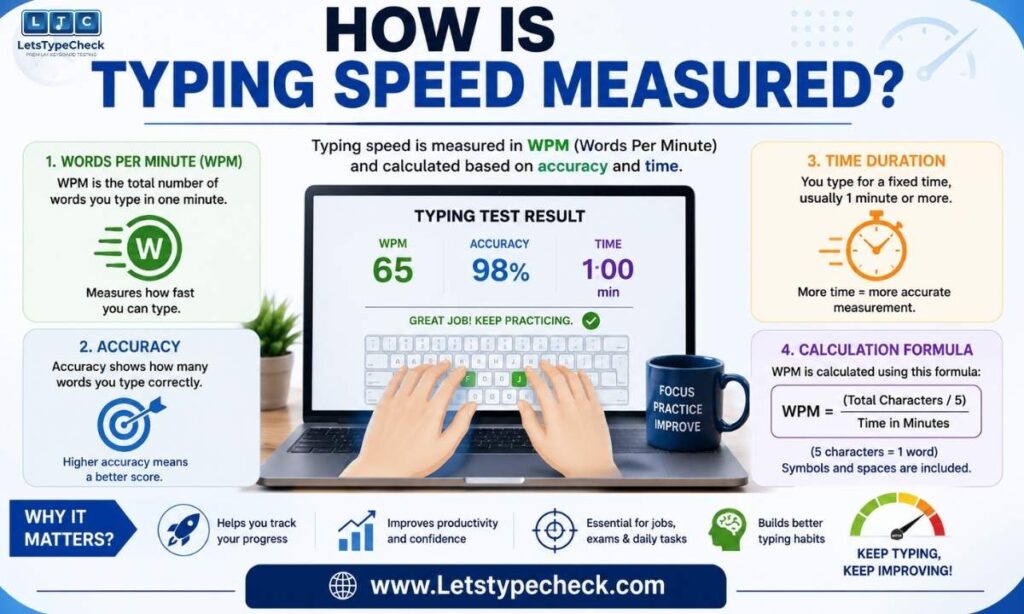
Typing speed is measured in words per minute, but a “word” in a typing test is not a real word — it is a standardized unit of five characters, including spaces and punctuation. This keeps scores comparable whether the test text uses short common words or long technical ones.
- Gross WPM: Total characters typed ÷ 5, divided by minutes. This is your raw speed with mistakes included.
- Net WPM: (Characters ÷ 5 − uncorrected errors) ÷ minutes. This is the number employers actually look at, because it penalizes mistakes.
- Accuracy: The percentage of characters typed correctly. Aim for 95% minimum; professional roles typically expect 97% or better.
- KDPH (key depressions per hour): Used in many Indian government exams instead of WPM. As a rough conversion, 8,000 KDPH is approximately 27 WPM and 10,500 KDPH is approximately 35 WPM.
Good Typing Speed by Profession
Employers set very different WPM thresholds depending on how central typing is to the role. The table below combines typical minimums seen in job postings with the preferred speeds that make you a comfortable hire:
| Job Role | Minimum WPM | Preferred WPM | Typical Accuracy |
| General office / admin | 40 | 55–65 | 95% |
| Customer service / support | 50 | 65 | 96% |
| Data entry operator | 45 | 60–80 | 97% |
| Secretary / executive assistant | 55 | 70–75 | 97% |
| Transcriptionist (general) | 60 | 75–90 | 98% |
| Legal / medical transcription | 65–80 | 90–100+ | 99% |
| Journalist / content writer | 50 | 70–90 | 95% |
| Programmer / developer | No standard | 50–70 | Varies |
| Court reporter (stenotype) | 180 | 200–225 | 99%+ |
Two roles deserve extra notes:
- Programmers benefit less from raw WPM than from fluency with brackets, semicolons, and symbols — most coding time is spent thinking, not typing. That said, 50–70 WPM keeps code, comments, and documentation flowing without friction.
- Court reporters reach 200+ WPM only because they use a stenotype machine, which is a completely different skill from keyboard typing. Do not benchmark yourself against them.
Typing Speed Requirements for Government Exams and Jobs
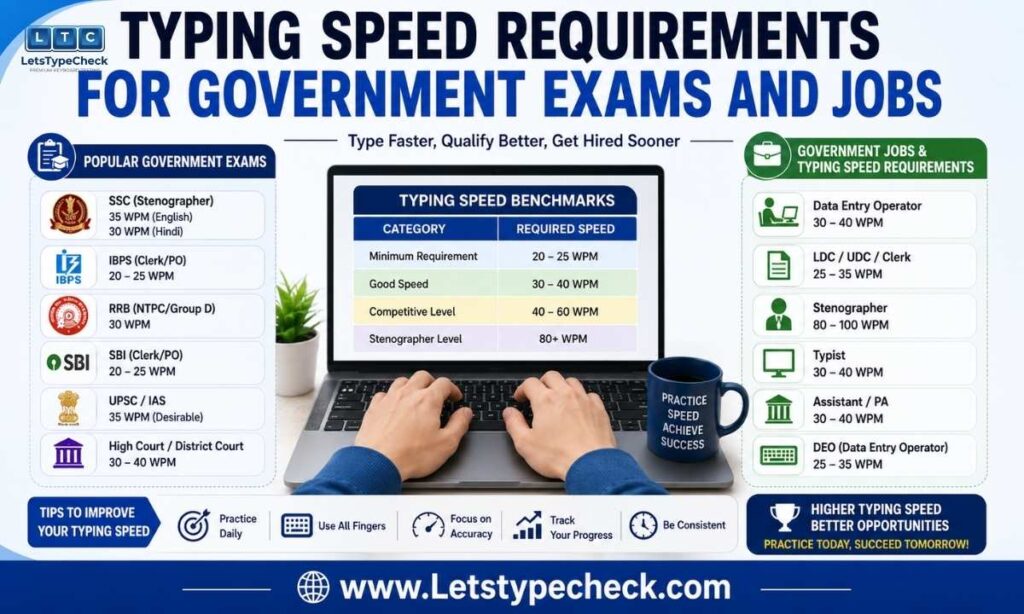
Government typing tests are usually the strictest and most clearly documented benchmarks anywhere, and failing the typing stage disqualifies you no matter how well you scored on the written exam. Here are the standards across major countries and Indian competitive exams:
Indian Government Exams
- SSC CGL (DEST): 2,000 key depressions in 15 minutes on a computer — roughly equivalent to 27 WPM sustained. It is a qualifying test, but errors above the permissible limit mean rejection.
- SSC CHSL — LDC/JSA: 35 WPM in English or 30 WPM in Hindi, tested over 10 minutes. Consistency over the full duration matters more than burst speed.
- SSC CHSL — DEO: 8,000 key depressions per hour, one of the tougher SSC typing standards, with strict error penalties.
- CPCT (Madhya Pradesh): 30 WPM minimum in English typing (Hindi typing scored separately), required for most MP government computer-based posts.
- RRB NTPC (typing posts): 30 WPM in English or 25 WPM in Hindi for roles like Junior Clerk and Accounts Clerk.
Other Countries
- United States: Federal clerical positions typically require 35–40 WPM, while government data entry roles ask for around 60 WPM at 97% accuracy.
- United Kingdom: Civil service admin roles generally expect 50–60 WPM; legal and transcription posts push to 70+ WPM at 98% accuracy.
- Australia: Public sector keyboarding is assessed against the AS2708-2001 standard, with most admin roles benchmarked at 40–60 WPM.
- Canada: Federal administrative roles commonly require 40–50 WPM at 95% accuracy.
Average Typing Speed by Age
Typing speed follows a predictable arc across life: it climbs through school years, peaks in the twenties when motor skills and daily keyboard hours are both at their maximum, and then declines slowly — though accuracy usually improves with age and experience.
| Age Group | Average WPM | Context |
| Children (6–10) | 5–20 | Learning key positions; mostly hunt-and-peck |
| Pre-teens (11–13) | 20–35 | School assignments drive regular practice |
| Teenagers (14–18) | 35–50 | Essays, messaging, and daily device use |
| Young adults (19–30) | 45–70 | Peak range; heavy keyboard hours from study and work |
| Adults (31–50) | 40–60 | Speed stabilizes; accuracy improves |
| Adults (51–60) | 35–55 | Slight raw-speed decline; accuracy stays high |
| Seniors (60+) | 25–45 | Slower raw speed, often excellent accuracy |
An important caveat: a 55-year-old typing 40 WPM at 99% accuracy produces more usable text per minute than a 22-year-old typing 55 WPM at 88% accuracy. Age-related decline in raw speed is real but smaller than most people assume, and trained technique beats youth at every age bracket.
What Is a Good Typing Speed for Students?
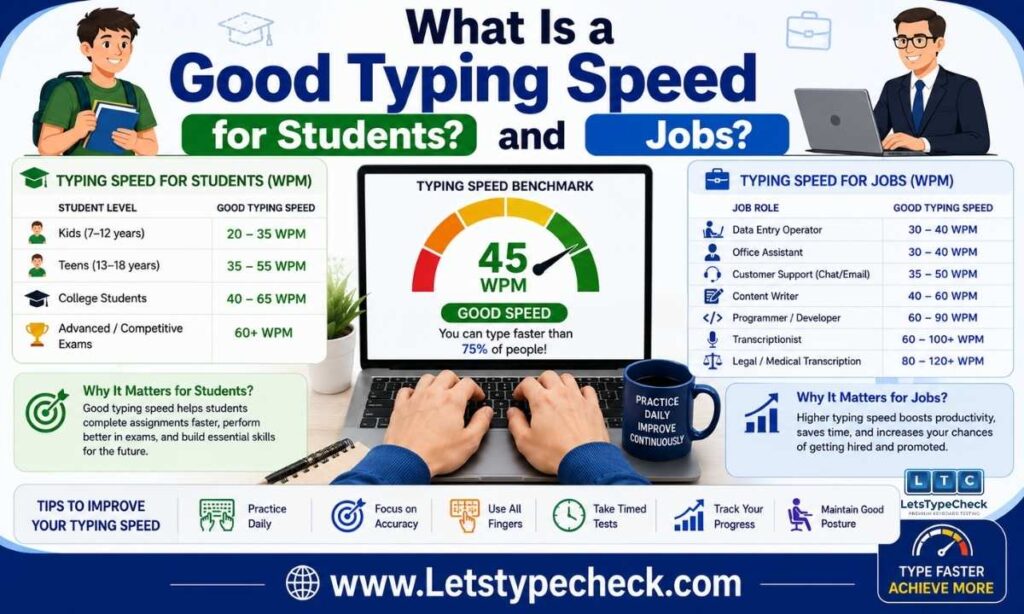
For students, the practical target is the speed at which typing stops slowing down your thinking. That threshold sits at around 50 WPM for essays and note-taking:
- Primary school: 10–25 WPM after initial typing instruction is normal and age-appropriate.
- High school: 35–50 WPM is typical; 50 WPM with 95% accuracy is a strong working benchmark before exams that involve typed answers.
- University: 45–65 WPM is common; pushing to 60–80 WPM noticeably speeds up assignments, lab reports, and lecture notes.
- Exam aspirants: If you are preparing for SSC, CPCT, RRB, or similar exams, train 5–10 WPM above the official requirement so exam-day pressure has a safety margin.
Speed vs. Accuracy: Which Matters More?
Accuracy wins, and the math makes it obvious. Consider two typists taking the same test:
- Typist A — 80 WPM at 85% accuracy: Around 12 errors every minute. Net WPM drops to roughly 68, and 15% of the output needs correction. This typist fails most employer accuracy cutoffs despite the impressive raw speed.
- Typist B — 60 WPM at 98% accuracy: About one error per minute. Net WPM is roughly 59, and nearly everything typed is immediately usable. This typist passes professional requirements comfortably.
Employers treat accuracy as a hard cutoff, not a nice-to-have, because every error costs correction time downstream. The practical rule: if your net WPM is more than 10% below your gross WPM, stop chasing speed and fix your error rate first. Speed built on a foundation of 95%+ accuracy is permanent; speed built on errors collapses under test conditions.
Touch Typing vs. Hunt and Peck
Your typing technique sets a hard ceiling on your speed, no matter how much you practice:
- Hunt and peck (looking at the keyboard, using 2–4 fingers) caps out around 25–35 WPM for most people, because your eyes constantly shuttle between screen and keys.
- Hybrid typing (partial touch technique with occasional glances) can reach 40–70 WPM but plateaus early and is hard to improve past that.
- Touch typing (all ten fingers anchored on the home row, eyes on the screen) routinely reaches 60–80+ WPM, because muscle memory replaces visual searching.
Switching from hunt-and-peck to touch typing feels slower for the first two to four weeks — you are rebuilding muscle memory from scratch — but it is the single highest-leverage change you can make. Nearly everyone who types above 80 WPM is a touch typist.
How Long Does It Take to Improve Your Typing Speed?
With 15–20 minutes of focused daily practice, improvement follows a fairly predictable timeline. Note that casual typing at work does not count — it reinforces existing habits rather than building new ones:
| Improvement Goal | Realistic Timeline |
| Under 20 WPM → 40 WPM | 4–8 weeks |
| 40 WPM → 60 WPM | 8–16 weeks |
| 60 WPM → 80 WPM | 16–26 weeks |
| 80 WPM → 100 WPM | 6–12 months |
The most common plateau sits between 60 and 80 WPM, where technique is learned but not yet automatic. Breaking through requires targeted drills on your weakest keys and letter combinations rather than more general practice. Set concrete goals — “reach 65 WPM at 95% accuracy within six weeks” beats “type faster” every time.
Typing Speed World Records

For perspective on the absolute human ceiling:
- 305 WPM — the unofficial peak recorded on TypeRacer by MythicalRocket, achieved in a short single-sentence burst.
- 256 WPM — Sean Wrona’s sustained speed over a longer session, widely considered the benchmark for real-world elite typing.
- 212 WPM peak / 170 WPM sustained — Barbara Blackburn’s Guinness-verified record, set on a Dvorak keyboard layout.
These records come from ideal conditions: short texts, optimized word choices, and sometimes non-QWERTY layouts. Even elite professional typists plateau at 80–120 WPM over a full working session — and beyond roughly 100 WPM, your reading and thinking speed becomes the bottleneck, not your fingers.
How to Improve Your Typing Speed?
If your current speed falls short of your target, this sequence delivers the fastest gains:
- Take a baseline test. Test yourself on different days and average the results — a single test can be 5–10 WPM off your true speed.
- Learn home row placement. Anchor your fingers on ASDF and JKL; and let the bumps on F and J guide you back without looking.
- Fix accuracy before speed. Slow down until you hold 95%+ accuracy consistently — speed built on errors always collapses under pressure.
- Practice 15 minutes daily. Short daily sessions beat occasional long ones because muscle memory consolidates between sessions.
- Drill your weak keys. Identify the specific letters and combinations that slow you down and target them directly instead of repeating full tests.
- Set a concrete target. Aim 10–15 WPM above your current average with a deadline, then re-test weekly to track progress.
For a complete step-by-step training plan, see our guide on how to type faster.
FAQs About Good Typing Speed
Is 40 WPM a good typing speed?
Yes for everyday use — 40 WPM is exactly the adult average and handles emails and browsing comfortably. For employment, though, most office roles expect 50–60 WPM, so 40 sits just below the hiring threshold.
Is 60 WPM a good typing speed?
Yes, 60 WPM with 95%+ accuracy is genuinely good and clears the requirement for most office, admin, and customer service jobs. At this speed you produce roughly 2,400 words per hour, which covers nearly all professional writing tasks.
Is 80 WPM fast?
Yes, 80 WPM is excellent and places you well into the advanced tier. With high accuracy, it qualifies you for demanding roles like transcription and high-volume content work.
Is 100 WPM good?
Yes — 100 WPM puts you roughly in the top few percent of all typists. Virtually everyone at this level has used proper ten-finger touch typing consistently for years.
What is the average typing speed?
The average adult types around 40 WPM, with most people falling between 30 and 60 WPM. Trained touch typists average noticeably higher, typically 60–80 WPM.
What typing speed do employers require?
General office roles usually ask for 40–60 WPM, customer service for 50–65 WPM, and transcription roles for 80–100+ WPM with near-perfect accuracy. Government exams publish their own specific standards, typically 25–60 WPM depending on the post.
What typing speed is required for SSC exams?
SSC CHSL requires 35 WPM in English or 30 WPM in Hindi for LDC posts, while SSC CGL’s DEST asks for 2,000 key depressions in 15 minutes. Train slightly above these minimums so exam pressure has a built-in margin.
How is WPM calculated?
WPM counts every five characters (including spaces) as one word: total characters ÷ 5 ÷ minutes. Net WPM subtracts uncorrected errors first, and it is the figure most employers use.
How long does it take to learn touch typing?
Most people see measurable improvement within 2–4 weeks of 15-minute daily sessions. Full touch typing fluency at a comfortable 60+ WPM typically takes 2–3 months of consistent practice.
What is the fastest typing speed ever recorded?
The unofficial peak is 305 WPM in a short burst, while Sean Wrona’s 256 WPM stands as the best sustained speed. Barbara Blackburn’s 212 WPM on a Dvorak layout remains the classic Guinness-verified record.