
Most people settle at around 35 to 40 words per minute and quietly accept that this is just how fast their hands move. It is not. Typing speed is a trained skill, exactly like riding a bicycle or playing an instrument, and the difference between an average typist and a fast one almost never comes down to talent. It comes down to a handful of habits: where your fingers rest, whether your eyes stay on the screen, and how you practice. Fix those habits, and adding 15 to 25 WPM within a month is a realistic goal for almost anyone.
This guide walks you through ten proven tips to type faster, arranged in the order you should learn them. Along the way, we will also cover the things most tutorials skip: why your speed usually drops before it improves, how to escape a stubborn WPM plateau, how long realistic progress actually takes, and the typing speed targets you need if you are preparing for a competitive exam or a data entry job. Take a quick typing speed test before you start so you have a baseline number to beat.
What Counts as Fast Typing?
Before chasing speed, it helps to know what the numbers mean. Typing speed is measured in words per minute (WPM), where one “word” is standardized as five characters including spaces. Many typing tests also report two versions of your score: gross WPM, which is your raw output, and net WPM, which subtracts a penalty for errors. Net WPM is the number employers and exam boards care about, because a page full of typos is not productive work no matter how quickly it was produced.
Here is a simple way to place yourself:
- Below 30 WPM – beginner range, usually a sign of hunt-and-peck typing with two or three fingers.
- 30–45 WPM – the average adult who never formally learned to type.
- 45–65 WPM – comfortable for office work, email-heavy jobs, and most data entry roles.
- 65–85 WPM – professional level; writers, programmers, and administrative staff often sit here.
- 85+ WPM – advanced territory, and 100+ puts you among genuinely fast typists.
Wherever you are on this scale today, the ten tips below are how you move up it.
1. Anchor Your Fingers on the Home Row
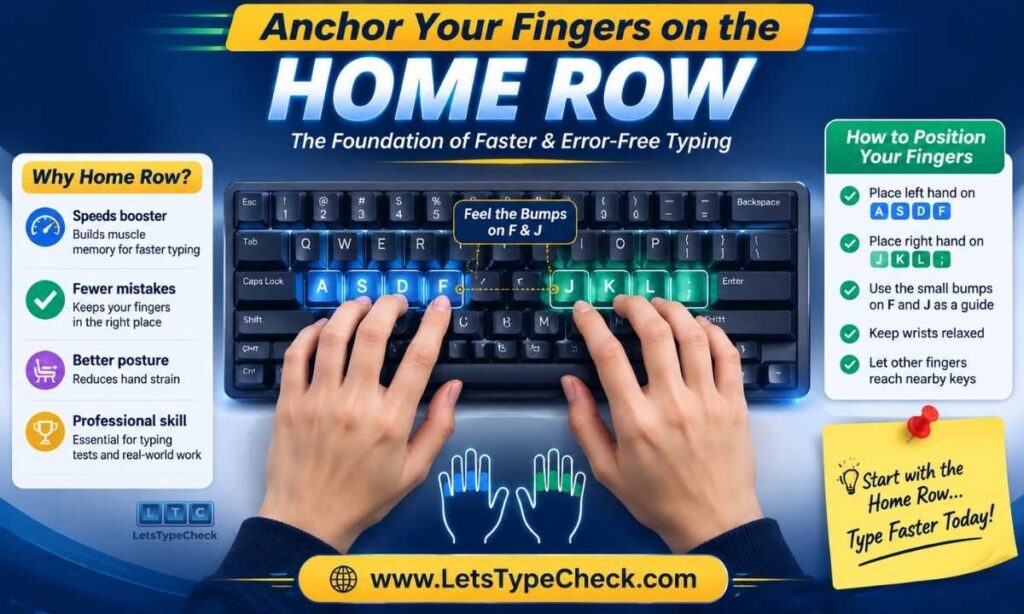
Everything in fast typing is built on one physical habit: your fingers always start from, and return to, the home row. That means the left hand rests on A, S, D and F, and the right hand rests on J, K, L and the semicolon key. Run a fingertip over F and J and you will feel two small raised bumps — they exist so you can find this position by touch alone, without ever glancing down.
- Rest your index fingers on F and J and let the other fingers fall naturally onto the neighboring keys.
- Keep both thumbs floating over the spacebar; either thumb can press it.
- After every single keystroke, bring the finger back to its home position. This return habit is what makes typing without looking possible.
- Spend your first few practice sessions on home-row-only drills, even if it feels painfully slow. You are laying the foundation for every other tip in this list.
2. Give Every Finger Its Own Keys
Self-taught typists usually lean on their two or three strongest fingers and let the rest go along for the ride. That works up to a point — and then it becomes the ceiling you cannot break through. Touch typing solves this by dividing the keyboard into zones, with each finger permanently responsible for its own small set of keys.
- Your pinky fingers handle the outer columns plus Shift and Enter; your index fingers cover the busy middle of the keyboard.
- Use the correct finger even when the wrong one feels quicker in the moment. Shortcuts here build faulty muscle memory that is very hard to undo later.
- Keep a finger-placement chart visible near your monitor for the first couple of weeks until the zones feel automatic.
- A bonus you will notice quickly: spreading the work across ten fingers dramatically reduces hand fatigue during long sessions.
3. Make Accuracy Your First Target, Not Speed
This is the tip almost everyone ignores, and it is the one that matters most. Every mistake costs you three actions — typing the wrong character, pressing backspace, and typing the correct character — so a “fast” typist with sloppy accuracy often produces less finished text than a slower, cleaner one. More importantly, practicing at a speed where you make constant errors trains your fingers to repeat those errors.
- Slow down until you can hold at least 95–98% accuracy in practice sessions. If accuracy dips below that, reduce your pace until it recovers.
- Treat speed as a side effect: when clean keystrokes become automatic, WPM rises on its own without you forcing it.
- Think of it like learning music — slow and correct always beats fast and messy, because you are recording patterns into muscle memory either way.
- Check your accuracy percentage after every test, not just your WPM. It is the better predictor of long-term progress.
4. Keep Your Eyes on the Screen, Not the Keyboard
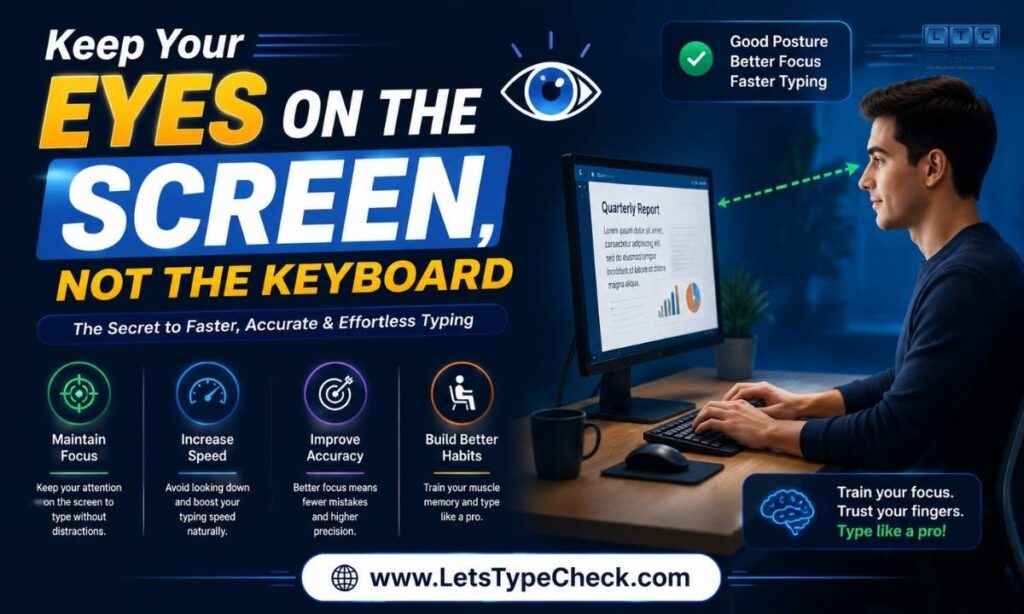
Glancing down at your hands is the single biggest speed killer in typing. Each look forces your eyes to leave the text, locate a key, and travel back to find your place — a loop that costs time and breaks concentration. Fast typists do something hunt-and-peck typists physically cannot: they read the next word while their fingers finish the current one.
- Commit to a hard rule from day one: no looking down, even when it slows you temporarily.
- If the urge is too strong, drape a light cloth or towel over your hands, or practice on a keyboard with blank keycaps.
- Expect a rough first week. Your fingers will miss keys, and that is fine — they are learning positions by touch instead of sight.
- Once your eyes stay up, start consciously reading one word ahead of what you are typing. This “read-ahead” habit alone separates intermediate typists from fast ones.
5. Practice 15 Minutes Every Day
Typing is a motor skill, and motor skills grow through frequent, short repetition — not occasional marathons. Fifteen focused minutes every day will beat a two-hour session on Sunday, because your brain consolidates new muscle memory during sleep. Daily practice means your fingers get a fresh consolidation cycle every single night.
- Attach practice to an existing routine: right after breakfast, or as a warm-up before you start work.
- A simple session structure: one quick 1-minute test as a warm-up, ten minutes of focused technique practice, then one timed test to log your result.
- On genuinely busy days, even a single 1-minute typing test keeps the habit alive and your skill from sliding backward.
- Consistency compounds quietly. Two weeks in, you will feel the difference; a month in, you will see it clearly in your scores.
6. Type to a Steady Rhythm
Watch a slow typist and you will notice a burst-and-stall pattern: they sprint through familiar words like “the” and “and,” then freeze on anything unusual. Fast typists are different — their keystrokes land at an almost even tempo, like a metronome. That evenness is not just pleasant to hear; it prevents the rushed keystrokes where most errors happen.
- Aim for consistent spacing between keystrokes rather than maximum bursts of speed.
- If you stall on longer words, break them into familiar chunks — type “un-der-stand-ing” as four small units rather than one intimidating word.
- Try practicing with a slow metronome beat occasionally, landing one keystroke per beat, then gradually raising the tempo.
- A steady rhythm also keeps your hands relaxed, which matters more and more as sessions get longer.
7. Fix Your Posture and Wrist Position
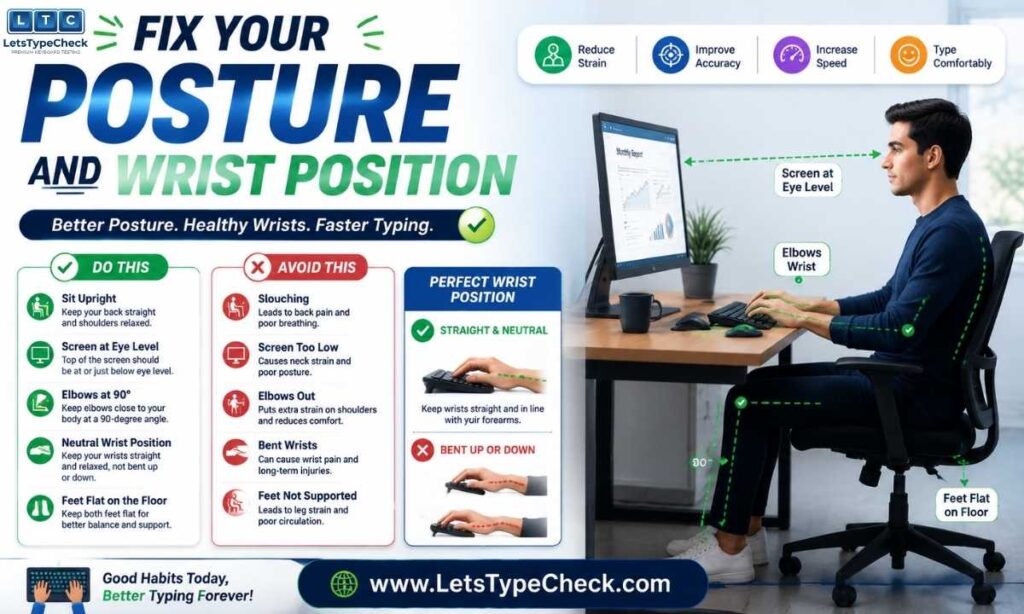
Your typing speed is limited by how freely your fingers can move, and how freely your fingers move depends on your posture. Slouching, craning toward the screen, or planting your wrists on the desk all restrict finger range and invite the kind of strain that cuts practice sessions short.
- Sit upright with your back supported and both feet flat on the floor.
- Keep your elbows bent at roughly 90 degrees, hanging relaxed at your sides.
- Let your wrists float just above the keyboard while actively typing — wrist rests are for pauses, not for keystrokes.
- Position the top of your monitor at eye level so your neck stays neutral and your eyes stay naturally on the screen.
- Good ergonomics is not just injury prevention; it directly extends how long you can type at peak speed before fatigue sets in.
8. Find and Drill Your Problem Keys
Nobody is uniformly slow. Almost everyone has a handful of specific keys or letter combinations that cause a disproportionate share of their errors — often the number row, punctuation, or awkward reaches like B and Y. Generic practice improves everything a little; targeted practice attacks your actual bottleneck.
- After each typing test, note which characters you missed. Patterns appear within a few sessions.
- Spend two or three minutes per session drilling only your weakest keys and combinations.
- Practice common letter pairs (like “th,” “ing,” and “tion”) as single fluid motions instead of individual letters.
- If your work involves coding or data entry, drill numbers and symbols deliberately — standard word tests barely touch them.
9. Use the Opposite Shift Key and Learn Basic Shortcuts
Here is a small technique fix with an outsized payoff: capital letters. Most self-taught typists press Shift with the same hand that types the letter, forcing an awkward one-handed stretch that breaks their rhythm. The correct habit is the opposite-hand rule — and while you are refining hand habits, a few keyboard shortcuts will save you far more time than raw WPM ever will.
- For a capital letter typed by your left hand, hold the right Shift with your right pinky — and vice versa.
- It feels strange for about a week, then becomes automatic and noticeably smoother.
- Learn a small core of shortcuts: Ctrl+Backspace deletes a whole word, Ctrl+Arrow jumps the cursor word by word, and Ctrl+Z undoes mistakes instantly.
- Every trip from keyboard to mouse costs a couple of seconds; shortcuts keep your hands where the work happens.
10. Track Your Weekly Average, Not Every Single Test
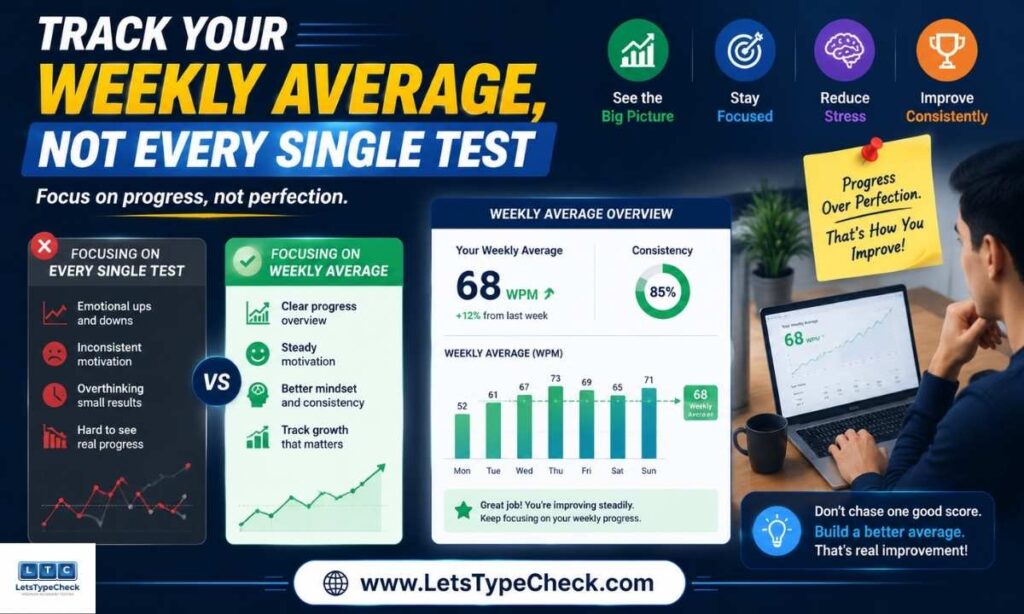
Your WPM on any individual test swings with your mood, the difficulty of the passage, the time of day, and plain luck. Judging your progress by single results is a fast route to unnecessary frustration. What actually tells the truth is your trend across a week or more.
- Record your score after each daily session — a simple notebook or spreadsheet is enough.
- Compare weekly averages instead of daily results; a rising weekly line is real progress even if individual days bounce around.
- Celebrate accuracy milestones as much as speed milestones. Holding 98% at your current speed is a genuine achievement.
- If your weekly average has been flat for three weeks or more, you have hit a plateau — and the next section is for you.
Why Your Speed Drops Before It Improves?
If you switch from hunt-and-peck to proper touch typing, prepare for something demoralizing: your speed will probably fall for the first one to two weeks. This is normal, expected, and temporary. You are replacing an old, deeply grooved habit with a new one, and for a short window the new habit is weaker than the old one was.
- A temporary dip of 5–15 WPM in the first two weeks is completely typical.
- Most learners return to their old baseline by week three or four — but now with correct technique underneath it.
- From there, growth continues past your old ceiling, which was the whole point of switching.
- The learners who fail are almost always the ones who panic during the dip and revert to old habits. Push through it; the dip is proof the retraining is working.
Stuck at the Same Speed? How to Break a Typing Plateau
Plateaus are not random — they tend to appear at predictable stages, and each stage has a different cause and a different fix. Diagnose which one describes you:
- Stuck under 60 WPM: this is almost always a technique problem. You are likely still glancing at the keyboard or drifting off the home row. Go back to tips 1–4 and rebuild the fundamentals at a slower speed.
- Stuck between 60 and 80 WPM: your fingers are fine; your brain is the bottleneck. You are processing one letter at a time. Train yourself to read and type whole words as single units, treating common sequences as one motion.
- Stuck above 80 WPM: refinement stage. Work on overlapping keystrokes, where the next finger starts moving before the previous key is fully released. Harder practice texts with unusual vocabulary also help expose hidden weaknesses.
- At every level: variety breaks plateaus. If you always take the same test, you are memorizing a passage, not improving as a typist. Rotate test lengths, difficulty levels, and content types.
How Long Does It Really Take to Type Faster?
With 15 to 20 minutes of daily practice, here is an honest timeline of what most learners experience:
- Weeks 1–2: the adjustment period. New finger habits feel clumsy, and speed may temporarily dip while old habits are unlearned.
- Weeks 3–4: muscle memory clicks in. You return to your old speed with far better form, and accuracy climbs noticeably.
- Month 2: visible gains — most people sit 10–20 WPM above their starting point by now.
- Month 3 and beyond: steady compounding. Reaching a professional 65–75 WPM typically takes two to three months of consistent daily work; 80+ takes longer and depends on deliberate plateau-breaking.
The single biggest variable is not talent — it is whether the practice actually happens every day.
Typing Speed Targets for Government Exams and Jobs
If you are preparing for a typing test as part of a job or a competitive exam, vague goals like “type faster” are not enough — you need to train toward a specific number under exam-like conditions. Typing requirements are usually stated either in WPM or in key depressions per hour (KDPH), and accuracy rules can be strict.
- SSC CHSL and CGL (DEST/typing test): the standard benchmark works out to roughly 35 WPM in English or 30 WPM in Hindi, sustained over a 10–15 minute passage.
- CPCT (Madhya Pradesh): requires a minimum of 30 WPM in English and 20 WPM in Hindi, alongside the computer proficiency section.
- RRB and other railway posts: typing-qualified posts generally expect around 25–30 WPM English or 25 WPM Hindi.
- Private data entry and BPO roles: most employers screen at 40–50 WPM with high accuracy, and faster candidates stand out immediately.
- Exam-specific advice: practice full-length timed passages, not just 1-minute sprints — sustaining speed for 10 minutes is a different skill from a short burst. And because uncorrected errors are penalized heavily, build the habit of fixing mistakes immediately as you type.
Always verify the exact current requirement in your exam’s official notification, as boards do revise their rules.
FAQs About Typing Faster
How can I type faster in one week?
In a single week, focus on two things only: stop looking at the keyboard and keep your fingers anchored to the home row. These two habits deliver the quickest measurable improvement.
What is a good typing speed?
Around 40 WPM is average, 60–75 WPM is strong professional territory, and 100+ WPM is genuinely fast. For most jobs, 45–60 WPM with high accuracy is more than enough.
Why does my typing speed go down when I practice properly?
Switching to correct technique temporarily weakens your output while old habits are replaced — a dip of 5–15 WPM for a week or two is normal. Speed returns quickly and then climbs past your old ceiling.
Is 15 minutes of typing practice a day really enough?
Yes — short daily sessions outperform long weekly ones because muscle memory consolidates during sleep. Fifteen focused minutes daily produces visible gains within three to four weeks.
Does a mechanical keyboard make you type faster?
Not by itself. Better keyboards can improve comfort and feedback, but technique matters far more — plenty of people type over 100 WPM on ordinary laptop keyboards.
Should I fix mistakes while typing or leave them?
For exams and real work, correct errors immediately, since uncorrected mistakes carry heavy penalties and net WPM is what counts. During pure speed drills, you can occasionally let errors go to practice flow.
How do I stop looking at the keyboard while typing?
Cover your hands with a light cloth or use blank keycaps so peeking simply stops working. Expect an awkward few days, after which your fingers learn key positions by touch.
Can I still learn touch typing as an adult?
Absolutely — age is not a barrier, only ingrained habits are. Adults who practice daily typically reach comfortable touch typing within two to three months.
Final Thoughts
Typing faster is not about pushing your hands harder — it is about removing the friction your current habits create. Anchor to the home row, keep your eyes up, put accuracy before speed, and show up for fifteen minutes a day. Do that consistently and the WPM takes care of itself: most people gain 15–25 WPM within their first month and keep climbing from there.
The best time to start is right now, while the tips are fresh. Take a 1-minute typing test to record today’s baseline, pick the two tips that target your weakest habit, and check your number again in seven days. Your future self — the one finishing work faster with relaxed hands — will be glad you did.