
If you’re applying for a data entry role, the job posting probably lists a number — “40 WPM,” “8,000 KPH,” or sometimes both — without explaining what it actually means for you. Data entry testing is different from a general typing test: employers care less about how fast your fingers move and more about how few mistakes you make while they’re moving. A 65 WPM typist with sloppy accuracy will lose to a 50 WPM typist who barely ever mistypes a number.
This guide breaks down the real WPM and KPH benchmarks employers use, how the accuracy penalty actually works, what a data entry test looks like in practice, and how to prepare so you walk in ready rather than guessing.
WPM vs. KPH: Which One Do You Need?
Data entry jobs are tested with one of two metrics, depending on what you’ll actually be typing on the job.
- WPM (Words Per Minute) is used for alphanumeric data entry — typing standard text across the full keyboard, such as names, addresses, and mixed records. Example: “John Smith, 123 Main St, Apt 4B.”
- KPH (Keystrokes Per Hour) is used for strictly numeric data entry — how fast you can enter raw numbers using only the 10-key numpad. Example: “48920 18492 59021 84920.”
If a job posting mentions KPH, it’s specifically checking whether you can touch-type on a numeric pad — you can’t reach 10,000 KPH using the number row across the top of the keyboard, because your hand has to travel too far between keys.
Speed & Accuracy Benchmarks by Data Entry Role
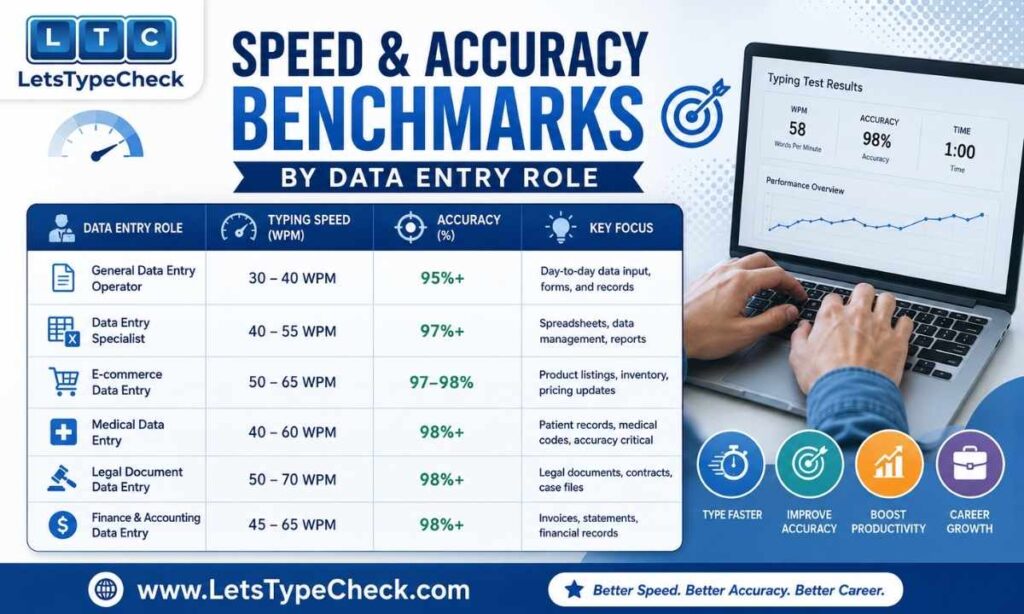
Generic “40–60 WPM” advice doesn’t tell you much, because data entry covers a wide range of roles with different accuracy stakes. Here’s how the benchmarks actually break down:
| Data Entry Role | Alphanumeric Speed (WPM) | Numeric Speed (KPH) |
| General / entry-level clerk | 40–50 WPM, 95%+ accuracy | 8,000–9,000 KPH |
| Invoice / billing processor | 50–60 WPM, 97%+ accuracy | 10,000–12,000 KPH |
| Insurance / medical records | 55–65 WPM, 97–98% accuracy | 12,000+ KPH |
| Remote / freelance data entry | 45–60 WPM, 95%+ accuracy | 9,000–11,000 KPH |
| Government DEO (SSC/CPCT-style) | 30–35 NWPM (exam-specific) | ~8,000 KDPH benchmark |
Back-office roles — insurance, banking operations, medical records — set the bar higher because error correction there is expensive and slow.
For a broader breakdown of speed requirements across office and government roles, see our typing test for jobs guide. If you’re specifically targeting a government DEO post, the CPCT typing test guide covers the state-level exam format and NWPM scoring in full.
The 98% Accuracy Rule — and the Math Behind It
Data entry employers almost universally enforce an accuracy floor of 98–99%. The reasoning is simple: a typo in data entry isn’t a red squiggly line, it’s a wrong invoice total, a misfiled record, or a mailing sent to the wrong address.
Most testing software doesn’t score your raw (gross) speed — it scores your net speed, which subtracts a penalty for every error. Here’s what that looks like in practice for a 5-minute alphanumeric test:
| Metric | Value |
| Gross WPM (raw speed, 5-minute test) | 58 WPM |
| Uncorrected errors | 9 errors |
| Net WPM (Gross − errors ÷ minutes) | 58 − (9 ÷ 5) ≈ 56.2 WPM |
| Accuracy | 94.5% |
| Meets a 55 WPM / 97% job posting? | Speed passes — accuracy does not |
Notice that 58 gross WPM sounds like a comfortable pass for a 55 WPM posting — but once errors are factored in, both the net WPM and the accuracy percentage fall short of a 97% requirement. This is why practicing for accuracy first, and only then chasing speed, consistently outperforms the reverse.
For the full mechanics of how gross and net scores are calculated, see our gross WPM vs. net WPM guide.
What’s Actually in a Data Entry Typing Test
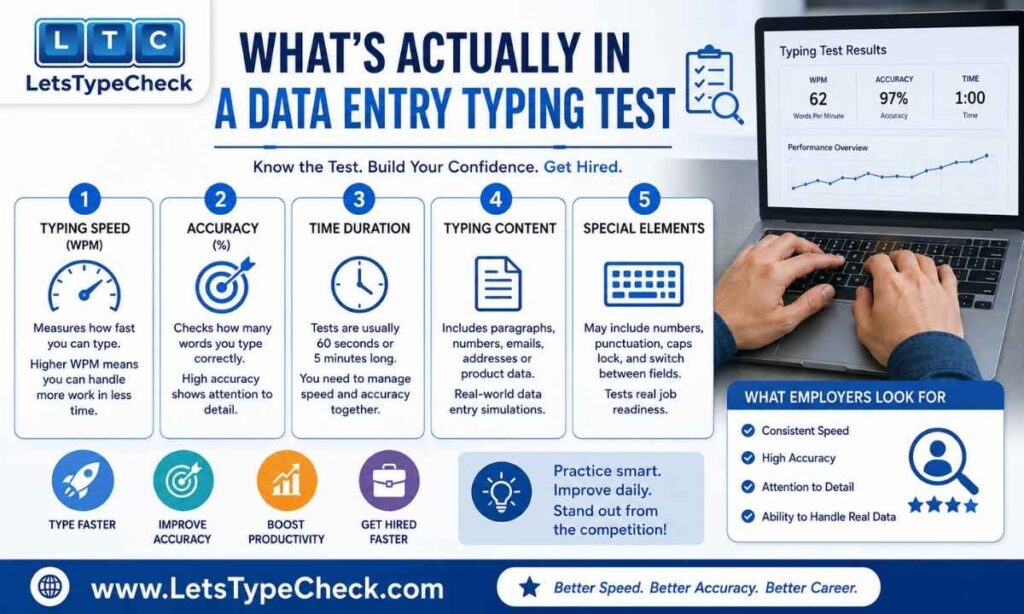
A generic typing test uses clean prose. A real data entry test rarely does — and that’s exactly where candidates who only practiced paragraphs lose points. Expect a mix of:
- Dates in multiple formats — MM/DD/YYYY, DD-MM-YYYY, and written-out dates in the same passage
- Currency and numeric figures — dollar amounts, decimals, percentages
- ZIP/postal codes and phone numbers, often with dashes, parentheses, or country codes
- Invoice, part, and SKU numbers — mixed-case alphanumeric strings with no contextual meaning to help you catch a mistake
- Addresses and names — proper nouns that spell-check won’t flag if mistyped
Because this content lacks the contextual cues of normal sentences (your brain can’t “guess” the next digit of an invoice number the way it can guess the next word in a sentence), accuracy tends to drop noticeably compared to a plain-text test. Practicing exclusively with paragraphs will overstate how ready you actually are.
Mastering the 10-Key Numpad
If your role or test uses KPH, numeric touch typing is a distinct skill from typing letters. The numpad’s 5 key has a small raised bump — that’s your anchor point.
- Index finger: controls 1, 4, 7 and NumLock
- Middle finger: anchors on 5 (the bump), controls 2, 5, 8 and the slash key
- Ring finger: controls 3, 6, 9 and the asterisk key
- Pinky: handles Enter and the plus/minus keys
- Thumb: rests on the 0 key
Plant the heel of your hand on the desk and let your fingers drape over the keys in a relaxed arch — hovering the whole hand and stabbing at keys with two fingers is the most common habit that caps people around 6,000 KPH. For the equivalent breakdown on the main keyboard’s home row, see our finger placement guide.
How Employers Actually Test You
Corporate and staffing-agency data entry tests are usually run through dedicated assessment software rather than a casual online typing test. A few things are specific to data entry formats:
- You may be shown an image of a messy invoice, form, or handwritten document on one half of the screen and asked to enter it into a digital form on the other — not a straightforward paragraph to retype
- Some tests disable the backspace key entirely, or heavily penalize its use, to force deliberate, single-pass accuracy
- Tests typically run 3–5 minutes, with software extrapolating your result to an hourly KPH or WPM figure
For the full list of platforms employers use across office roles generally (Kenexa, CritiCall, Indeed Assessments, and others), see our typing test for jobs guide. If you’re preparing for an Indian government data entry exam specifically, the scoring system works differently — see our SSC CGL Data Entry Speed Test guide for how key depressions are scored instead of WPM.
Taking the Test Remotely
A growing share of data entry hiring happens without ever visiting an office. Remote data entry tests generally take one of three forms:
- Webcam-proctored — a live or recorded video feed confirms it’s actually you typing, with no assistance
- Screen-recorded — the assessment platform records your screen activity during the timed test for later review
- Take-home format — you’re given a fixed window (sometimes 24–48 hours) to complete a timed test on your own schedule, with the timer starting when you open it
Treat a remote test with the same seriousness as an in-person one: a quiet, uninterrupted space, a stable connection, and the same accuracy-first approach — proctoring software flags irregular pauses or copy-paste behavior, so typing everything manually matters.
Self-Check: Are You Ready?
Before applying, get an honest baseline rather than guessing. Head to our typing test and run the 5-minute typing test at medium difficulty, then check both numbers against the benchmark table above:
- Under 40 WPM or below 95% accuracy: you’re not test-ready yet for even entry-level roles — focus on accuracy drills before applying
- 40–55 WPM at 95–97% accuracy: you qualify for most general and remote data entry postings
- 55+ WPM at 97%+ accuracy: you’re competitive for higher-paying back-office, billing, and medical records roles
If your role will involve numeric entry, run the same check using the KPH-to-WPM conversion: divide your KPH by 60, then by 5, to get an equivalent WPM figure you can compare against the table.
A Practice Plan to Get There
Your starting point should determine your practice approach — a rigid one-size-fits-all calendar wastes time either over- or under-preparing you.
- Below 30 WPM: Start with our Easy-difficulty tests in 1-minute sessions. Focus entirely on accuracy — do not chase speed until you’re consistently above 97% accuracy on plain text.
- 30–50 WPM: Move to Medium difficulty and 2-minute sessions. Begin introducing mixed content — practice typing addresses, dates, and invoice-style strings, not just paragraphs.
- 50+ WPM: Practice on Hard difficulty with 5-minute sessions to build sustained endurance, since most employer tests run 3–5 minutes rather than 1.
Across all levels, review your error report after each session rather than just your WPM number — fixing your most frequent mistakes has a bigger impact on your net score than raw speed drills. See our guide on common typing mistakes and fixes for a structured approach to that.
Frequently Asked Questions
What typing speed is required for data entry jobs?
Most entry-level data entry roles require 40–50 WPM with 95%+ accuracy. Back-office and specialized roles (billing, medical records) often require 55–65 WPM with 97%+ accuracy.
Is this Data Entry Typing Test free to use?
Yes, a data entry typing test is typically free and requires no sign-up. You can take it as many times as you like and track your WPM and accuracy each time.
How is my typing speed (WPM) calculated?
WPM is calculated as (correct characters ÷ 5) ÷ minutes. One word is counted as five characters, including spaces. Accuracy is reported separately as a percentage.
How long is a typical data entry typing test?
Most employers use a 5-minute test as the default, though duration and difficulty can vary depending on the specific job posting or platform.
What is a good Keystrokes Per Hour (KPH) for data entry?
8,000–10,000 KPH is considered proficient for entry-level roles. 12,000–15,000+ KPH is expected for competitive or specialized numeric roles like medical billing or accounting.
What is the difference between WPM and KPH in data entry?
WPM measures your speed typing standard text across the full keyboard. KPH measures raw numerical input speed on the 10-key numpad, and the two are not directly interchangeable without conversion.
How do you convert KPH to WPM?
Divide your KPH by 60 to get Keystrokes Per Minute, then divide that by 5 (the standard word length). For example, 12,000 KPH ÷ 60 = 200 KPM, and 200 ÷ 5 = 40 WPM.
What accuracy percentage do data entry jobs require?
Data entry jobs typically require 98–99% accuracy. Employers consistently prefer a slower typist with near-perfect accuracy over a faster typist who makes frequent errors.
Do I need to know my KPH if the job posting only lists WPM?
Not usually — if a posting lists only WPM, the role likely involves general alphanumeric entry rather than heavy numeric data entry, so KPH practice isn’t a priority.
What typing speed do government data entry operator exams require?
Indian government DEO exams like SSC and CPCT use their own scoring systems — SSC’s Data Entry Speed Test is measured in key depressions per hour rather than WPM, while CPCT sets a fixed NWPM minimum specific to the exam.