
Most people who plateau at 35–45 WPM assume they’ve hit their natural ceiling. They haven’t. In almost every case, a small, specific habit is quietly capping their speed — and because the habit feels normal after months or years of repetition, it never gets questioned. The fix usually isn’t “practice more.” It’s identifying exactly which habit is doing the damage and correcting that one thing.
This guide walks through the mistakes that show up most often — from the obvious ones (looking down, rushing) to the ones almost nobody talks about (device-specific errors, how exam scoring systems actually penalize small slips, and why fixing a mistake temporarily makes you slower before it makes you faster). Use the diagnostic below to jump straight to what’s likely holding you back.
Quick Diagnostic: Which Mistake Is Actually Slowing You Down?
Answer honestly — most people have one or two dominant mistakes, not all seven.
- Do you glance at your hands more than once every paragraph? → Looking at the Keyboard
- Do certain letters (G, B, H, Y, C) feel awkward or “off-finger”? → Wrong Finger Placement
- Does your accuracy drop noticeably when you try to go faster? → Rushing Before Accuracy
- Do your wrists or shoulders ache after 10+ minutes of typing? → Posture & Wrist Positioning
- Do you only practice in short bursts every few days? → Inconsistent Practice
- Do you press keys hard enough to feel them “hit bottom”? → Bottoming Out
- Are you still using fewer than 8 fingers to type? → Hunt-and-Peck
The 5 Core Habits That Cause Most Typing Mistakes
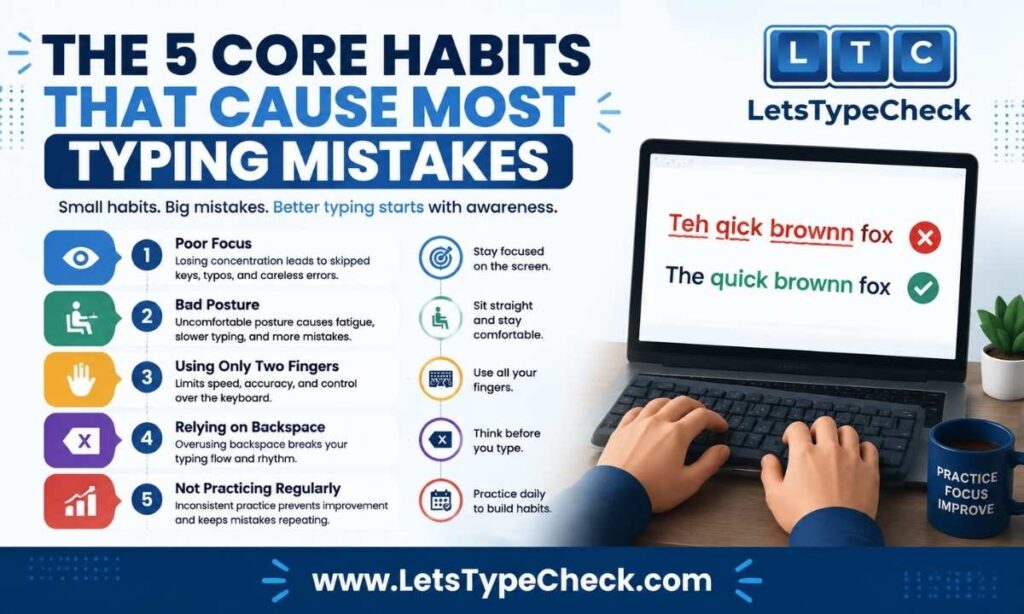
1. Looking at the Keyboard
This is the single most common mistake, and it’s also the most self-reinforcing one. Every time you glance down, your eyes have to travel to the keyboard, find the key, then travel back to the screen to confirm what you typed. That round trip happens dozens of times per minute for anyone who hasn’t fully committed to touch typing — and it silently caps your ceiling regardless of how fast your fingers can technically move.
- Why it happens: Your brain hasn’t fully mapped key positions to muscle memory yet, so it falls back on vision as a safety net.
- The fix: Rely on the raised bumps on F and J as home-row anchors. Cover your hands with a cloth or a keyboard cover for short practice sessions so looking down isn’t an option.
- Expect this: Your speed will drop for the first several sessions. That’s normal — see the section below on why the fix feels worse before it gets better.
2. Wrong Finger Placement
A lot of people who believe they touch-type are actually cheating in small ways — reaching across the keyboard with the wrong finger, especially on the center column (G, B, H, Y, C). It rarely feels like a problem in the moment, but it adds a fraction of a second to every keystroke and compounds over a full paragraph.
- Why it happens: Early on, whichever finger was closest got the job, and that shortcut never got corrected.
- The fix: Relearn strict finger-to-key mapping — G and B belong to the left index finger, H and Y to the right index finger — and return to the home row after every reach.
- Where to go deeper: Our Finger Placement for Typing guide has a full hand-by-hand key chart and drills.
3. Rushing Speed Before Accuracy
Chasing a higher number on the WPM counter before your fingers actually know the movements is one of the most common beginner mistakes — and one of the hardest to talk yourself out of, because slowing down feels like giving something up. It isn’t. A steady typist at 55 WPM with 98% accuracy will consistently beat someone spiking to 80 WPM with 85% accuracy, because errors cost far more than most people assume.
- Why it happens: Speed is the visible number; accuracy quietly does the work behind it.
- The fix: Stop watching the speed counter for a week. Aim for 97–98% accuracy at whatever speed that requires — even if it’s uncomfortably slow. Speed comes back on its own once accuracy stabilizes.
- Related read: What Is a Good Typing Speed? breaks down realistic speed-accuracy benchmarks by skill level.
4. Posture & Wrist Positioning
This mistake doesn’t show up in your WPM score directly — it shows up as fatigue, and fatigue quietly produces more of every other mistake on this list. Resting your wrists on the desk edge feels supportive, but it forces your fingers to stretch awkwardly for the top row and puts pressure directly on the carpal tunnel.
- Why it happens: Desks and chairs are rarely set up with typing ergonomics in mind, so people default to whatever feels stable.
- The fix: Keep wrists hovering, elbows near 90 degrees, and your screen at eye level. If you use a wrist rest, it’s for pauses only — never while actively typing.
- Longer-term fix: Take a 1–2 minute break every 25–30 minutes. Fatigue-driven errors increase sharply after that window.
5. Inconsistent Practice
Typing skill decays faster than people expect. A 2–3 day gap without practice can undo close to a week of progress, because muscle memory needs regular reinforcement to actually stick. Most people don’t notice this — they just feel like they’re “bad at typing” again, when really they just stopped too long.
- Why it happens: Typing practice rarely feels urgent, so it’s the first thing to get skipped.
- The fix: 15–20 minutes daily beats 2 hours once a week, every time. Short, frequent sessions are what actually build durable muscle memory.
- Where to practice: Our typing test works well for exactly this — short, repeatable sessions you can run daily.
Mechanical Habits That Hurt Accuracy
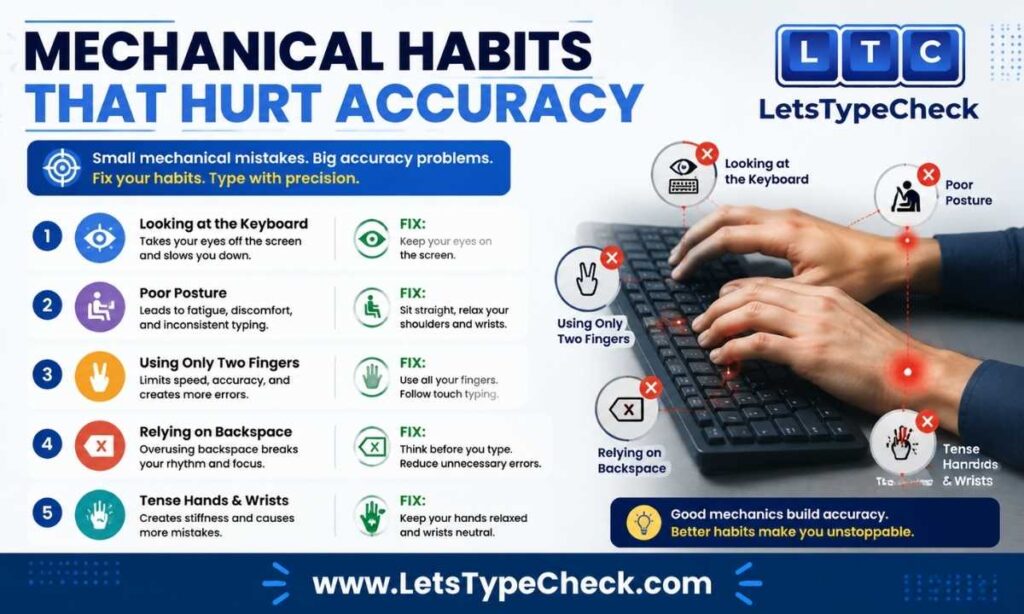
Beyond the five core habits, two mechanical issues quietly wreck accuracy and speed even in typists who’ve otherwise built good form.
- Bottoming out keys. Pressing a key all the way down until it hits the base isn’t necessary — most keyboards register a keystroke halfway through the travel. Bottoming out wastes stamina, fatigues your fingertips over long sessions, and adds a small rebound delay before the next keystroke. The fix is a lighter “float” touch — practice pressing a key as gently as possible and noticing exactly where it registers.
- Hunt-and-peck (not using all fingers). Typing with only 2–4 fingers caps most people around 30–40 WPM no matter how much they practice, because the finger travel distance is simply too long. The fix is committing to full touch typing from the home row outward — see our Touch Typing Guide for Beginners for a structured way to rebuild this from scratch.
The Error Types Behind “I Keep Making Mistakes”
Most typing advice talks about habits (looking down, rushing) without naming what the actual mistake looks like on screen. Knowing the category helps you catch the pattern faster:
- Substitution errors — hitting an adjacent key instead of the intended one (“teh” instead of “the”). Usually a finger-placement or accuracy issue.
- Transposition errors — two letters swap order (“form” instead of “from”). Usually a speed-outpacing-muscle-memory issue — your fingers try to hit the next key before fully releasing the current one.
- Omission errors — a letter gets dropped entirely, often in double-letter words (“comitte” instead of “committee”). Common when rushing through familiar words on autopilot.
- Insertion errors — an extra letter or space sneaks in, often from a finger lingering too long on a key.
- Autocorrect-induced errors — a genuinely correct word gets silently “corrected” into the wrong one. This is a growing category as more typing happens on phones and in apps with aggressive autocorrect, and it’s one spellcheck alone won’t catch because the result is a real, valid word.
Recognizing which category your mistakes fall into is often more useful than generic “type more” advice, because each category points to a different root cause.
Device-Specific Mistakes: Typing on Mobile and Touchscreens
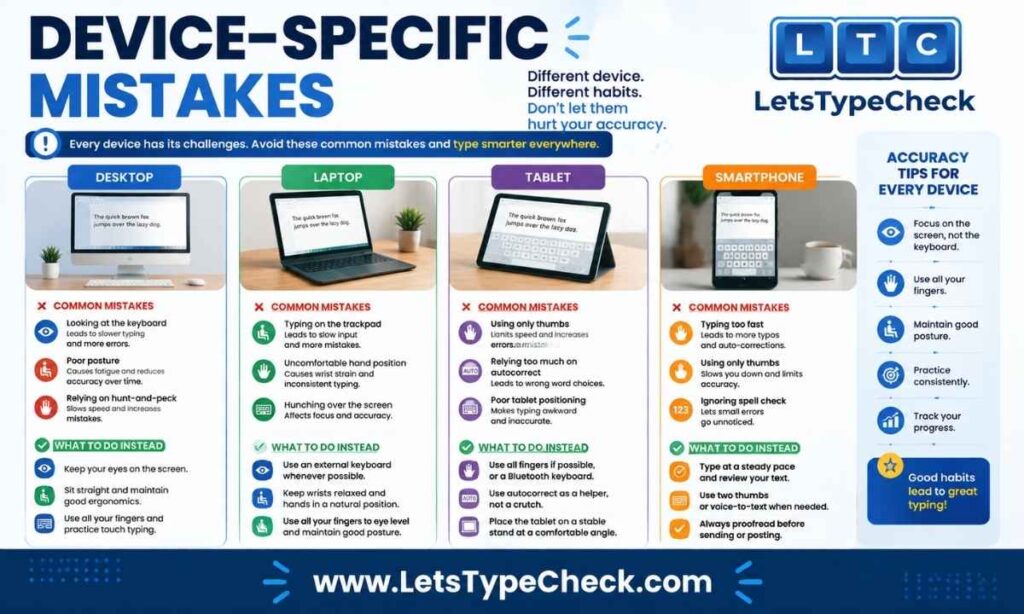
A meaningful share of daily typing now happens on phones and tablets, and the mistake patterns there are genuinely different from desktop typing:
- Thumb-typing errors. Small touch targets mean adjacent-key substitution errors are far more common than on a physical keyboard.
- Over-reliance on autocorrect. Autocorrect quietly hides a lot of substitution and omission errors — useful for speed, but it also means mobile accuracy stats can be misleading if you’re relying on a physical keyboard test to gauge real-world performance.
- External keyboard setups. For anyone practicing seriously on a phone or tablet, connecting a standard USB or Bluetooth keyboard (via an OTG or Type-C adapter) gives far more accurate practice than thumb-typing, since it builds the same muscle memory a desktop keyboard does.
Mistakes That Specifically Cost You on Government and Employment Typing Tests
If you’re practicing for an SSC, RRB, CPCT, or similar government exam — or a general employment typing test — the scoring system changes which mistakes matter most.
- Most of these exams distinguish between a Full Mistake (a wrong word, a missing word, an extra word) and a Half Mistake (a spacing error, a capitalization error, a punctuation error).
- A Full Mistake typically deducts a full word from your gross score; a Half Mistake deducts half a word.
- This means a “small” slip — a missing space or a lowercase letter where a capital was required — is scored, and several of them add up exactly like a handful of genuinely wrong words would.
- The practical takeaway: don’t just drill for speed. Drill for the specific error types (spacing, capitalization, punctuation) these exams penalize, since they’re often the ones typists notice least.
For the full breakdown of how these deductions translate into your final score, see our guide on Gross WPM vs Net WPM.
Why the Fix Feels Worse Before It Gets Better
This is the part almost nobody warns you about, and it’s the reason most people abandon a fix within the first few days.
When you correct a specific mistake — say, retraining your fingers to hit G and B correctly — you’re not just adding a new skill. You’re actively overriding a motor pattern your brain has reinforced for months or years. For a short window, your speed will drop, sometimes sharply, because the old pattern and the new one are competing for the same keystroke.
This is temporary, and it’s a sign the fix is actually working, not a sign it’s failing. Give any single correction at least a week of daily practice before judging whether it’s helping. Trying to fix more than one habit at once usually makes this dip worse and longer — which is why the 7-day plan below tackles one mistake per day instead of all of them simultaneously.
Self-Check: Use Your Typing Test Results to Spot the Pattern
You don’t need to guess which mistake applies to you. Run our typing test and look at your results panel — specifically the Mistakes count alongside your Accuracy percentage. A few patterns to watch for:
- High Mistakes count but decent WPM → likely rushing before accuracy, or bottoming out under speed pressure.
- Low WPM with high Accuracy → likely looking at the keyboard or hunt-and-peck typing, since your ceiling is mechanical rather than error-driven.
- Mistakes clustered around specific letters → almost always a finger-placement issue, not a speed issue.
If you’re newer to testing altogether, our Typing Test for Beginners guide walks through how to read your first results without over-interpreting a single session.
7-Day Fix Plan
Trying to fix everything at once is the fastest way to give up. Work through one focus area per day instead.
| Day | Focus | What To Do |
| Day 1 | Looking at the keyboard | Cover your hands, run a short typing test on Easy mode without looking down |
| Day 2 | Finger placement | Home-row drills using the Finger Placement guide |
| Day 3 | Accuracy over speed | Type at whatever speed gets you 98% accuracy — ignore the WPM number entirely |
| Day 4 | Posture & wrists | Set up your desk properly; take a break every 25–30 minutes |
| Day 5 | Full-finger typing | Practice deliberately reaching with the correct finger for every key, especially G/B/H/Y/C |
| Day 6 | Error-type review | Take a test, check your Mistakes breakdown, and identify which error category (substitution, transposition, omission) shows up most |
| Day 7 | Consistency check-in | Review the week, note which single habit improved the most, and keep drilling it into week two |
Frequently Asked Questions
Why do my typing mistakes increase when I try to type faster?
When your typing speed outpaces your muscle memory, your fingers start reaching for the next key before fully releasing the current one. This causes transposition and substitution errors — the fix is slowing down until your accuracy is consistently above 97%, then rebuilding speed gradually.
How long does it take to fix a bad typing habit?
Most single-habit corrections take about two to three weeks of daily practice to feel natural. Expect a temporary speed dip in the first few days — that’s a normal part of overriding old muscle memory, not a sign the fix isn’t working.
Is it bad to rest my wrists on the desk while typing?
Yes, if it’s while you’re actively typing. Resting your wrists on a hard edge restricts finger movement and can pressure the nerves in your wrist over time. Keep your wrists hovering while typing, and only rest them during pauses.
What’s the difference between a Full Mistake and a Half Mistake on typing exams?
A Full Mistake is a wrong, missing, or extra word, and it deducts a full word from your score. A Half Mistake is a spacing, capitalization, or punctuation error, and it deducts half a word — small, but it adds up quickly across a passage.
Can autocorrect actually cause more typing mistakes?
Yes. Autocorrect can silently change a correctly typed word into an incorrect one, especially on mobile devices. Because the result is still a real word, standard accuracy checks won’t always catch it, so it’s worth proofreading autocorrected text separately from typing-speed practice.
How can I tell which specific mistake is holding back my speed?
Run a typing test and look at your Mistakes and Accuracy numbers together. High mistakes with reasonable speed usually points to rushing or bottoming out; low speed with high accuracy usually points to looking at the keyboard or hunt-and-peck typing.
Conclusion
Nearly every typing plateau comes down to one or two specific, fixable habits rather than a hard ceiling on natural ability. The fastest path forward isn’t more typing in general — it’s identifying which mistake from this list actually applies to you, fixing it deliberately for a week or two, and expecting a temporary dip before the improvement shows up. Use the diagnostic and the 7-day plan above to make that process concrete instead of guesswork.